
Drag blade, cutting angle and offset
As the majority of cutting plotters available on the market are based on dragging blade technology, I would like to take this opportunity to summarise the key points regarding ‘dragging blades’.
Cutting angle, wedge angle
The following diagram shows how cutting angles and rake angles are calculated and what is meant by ‘offset’ (see also below):
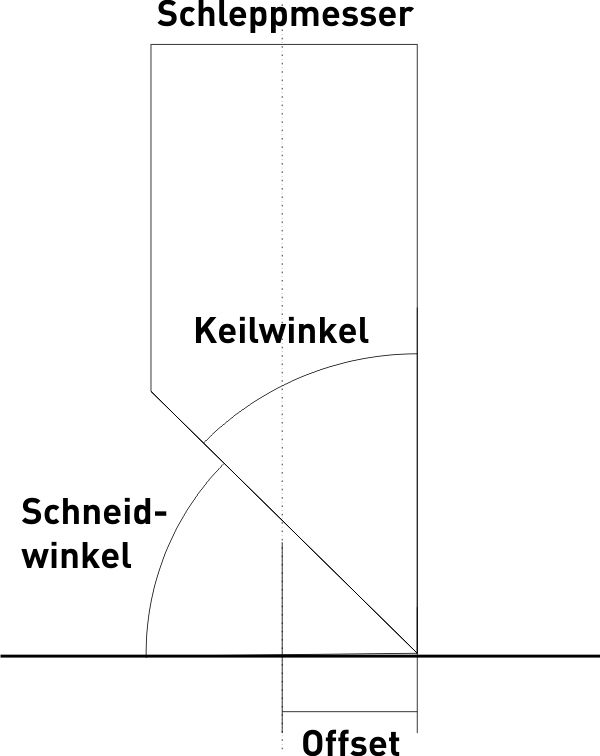
As a rule, the various types of drag knives are distinguished by their cutting angle, i.e. the angle between the material and the blade. Common classifications are as follows:
- 30° blade – for rougher plotting jobs on relatively thin material
- 45° blade – for finer cuts and standard material
- 60° blade – for the finest plots or thick material
As a general rule, the 60° blade is well suited to all plotting jobs and material thicknesses; however, it has a relatively short service life because the fine blade wears down more quickly in the material than the flatter blade of a 30° blade. You therefore have the choice between changing the blades more frequently or incurring slightly higher costs due to faster blade wear.
In some cases, the blades are also classified according to their wedge angle, in which case the angle specifications are exactly the reverse.
Offset
To explain the offset, I always like to use the example of a shopping trolley in a supermarket: just as the trolley’s wheels follow behind it when it turns or goes round bends, so too does the trailing knife in a cutting plotter follow behind the knife head.
To cause this movement – and, above all, the rotation – you need a lever arm: the offset. The offset is measured as the horizontal distance between the tip of the blade and the axis of rotation of the trailing knife. Although it is relatively small at approx. 0.25 mm, it is large enough to prevent precise plotting – in particular, corners can no longer be cut cleanly without appropriate compensation.
The following diagram shows the red path of a cutting plotter’s blade head in order to cut the black object – a rectangle – correctly. Whilst the blade head traces the circular path, the blade rotates on the spot.
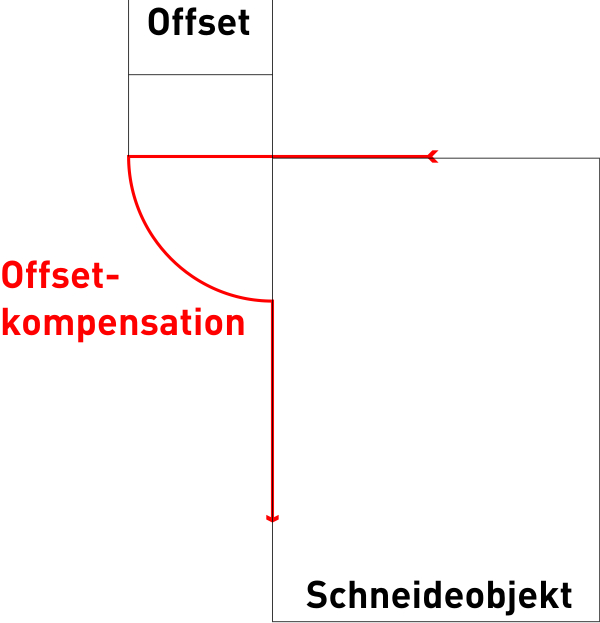
Depending on the model, the offset compensation is set either in the cutting software or directly in the cutting plotter’s menu. It is absolutely essential that the correct value for the current blade is always used. Otherwise, the objects will not be cut cleanly and will be difficult or impossible to weed.
When cutting thick material, it may be necessary to adjust the offset settings, as the effective offset decreases slightly as the material thickness increases. In such cases, the best value must be determined on a case-by-case basis through testing.